
One word. Both sides.
Chinese definitions and parts of speech sit beside each word, with phonetics on the opposite side. The current word uses your theme's highlight color.
A little meaning in every keystroke
Keep your rhythm. Get the meaning.
Add Chinese definitions and phonetics beside the words on Monkeytype, so every repetition becomes a chance to learn.
v0.4.5 · ZIP, about 2.6 MB · Chrome 111+
Give it a try. The meaning follows along.
Built around your practice
A little help, right where you need it.
Your familiar typing rhythm, with a clearer understanding.
Chinese definitions and parts of speech sit beside each word, with phonetics on the opposite side. The current word uses your theme's highlight color.
Meanings stay with previously typed words that are still visible. Preview the next two as the hints follow your typing, backspacing and line changes.
Definitions and phonetics are bundled with the extension. No remote translation service, no signup, no API key, and no practice text uploaded.
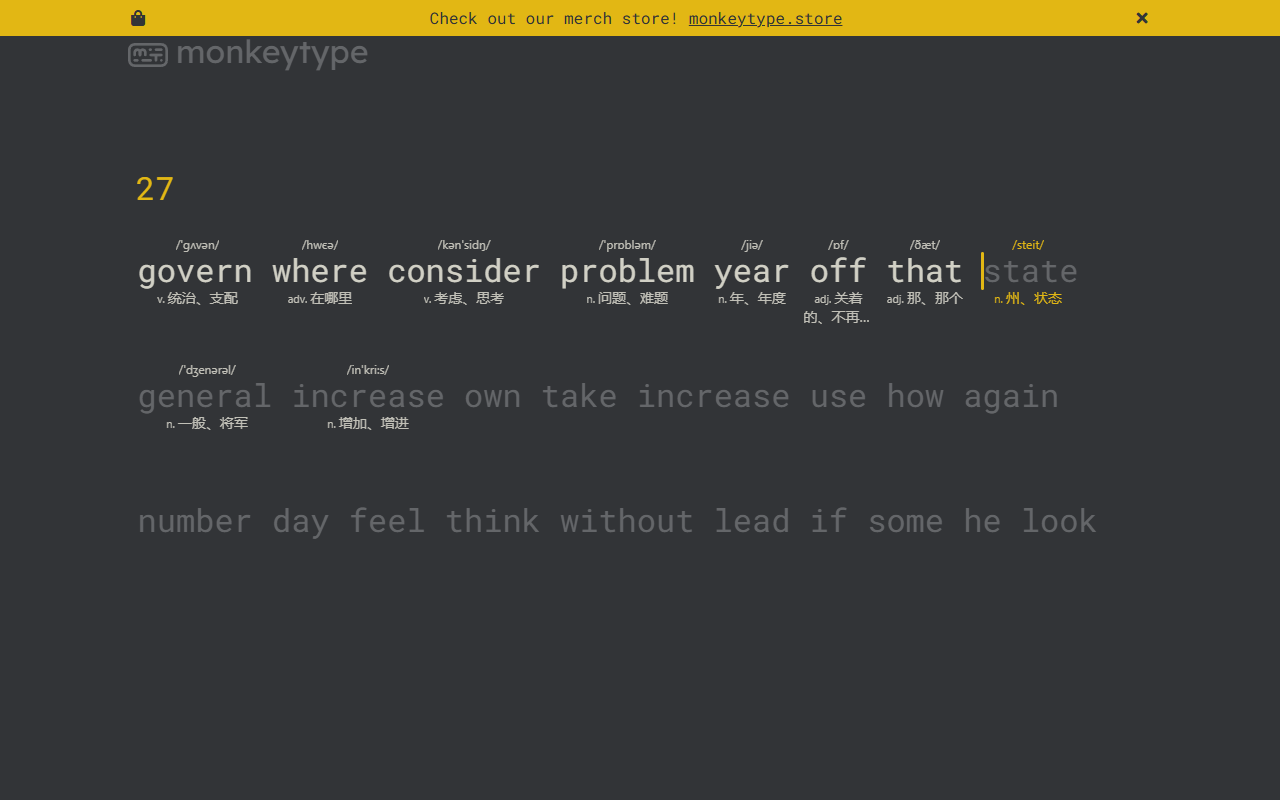
Actual page · Chinese belowFollows your Monkeytype theme
Small details, familiar rhythm
No heavy translation boxes. Just words in the right place. Choose the display you prefer, and keep it for your next practice.
Ready when you are
Install the ZIP package using Chrome's developer mode. You don't need developer tools or a build step to use the extension.
Download the ZIPExtract the ZIP into a folder you plan to keep. Find the directory containing manifest.json; you'll select it in the next step.
Open the address below. Enable “Developer mode” in the top right, click “Load unpacked”, and choose the folder you just extracted.
chrome://extensionsOpen or refresh monkeytype.com and choose English practice. Pin the extension to your toolbar to change positions, text size or the display toggle anytime.
No extension or Monkeytype account is required, and you don't need an API key. The bundled dictionary provides local definitions and phonetics without network requests. Accessing and using the Monkeytype website itself may still require an internet connection.
Not every word is covered. The dictionary contains 96,814 English entries, including 81,468 with phonetics. Uncommon words, names or custom text may show “未收录” (not found); words without reliable phonetics simply omit them. Existing ECDICT phonetics are supplemented with recorded whole-word American English pronunciations from CMUdict.
It shows concise definitions for individual words, supported parts of speech and available phonetics. It does not infer meanings from a whole sentence or play audio. Quote mode still uses word-by-word lookups. Zen and special Funbox modes that hide or alter target words are not guaranteed to work.
It hides definitions and phonetics and stops lookups. Original-word recognition continues in page memory so typing errors don't overwrite the target word. To stop page access entirely, disable the extension or revoke its site access in Chrome, then refresh or close existing Monkeytype tabs. Read the privacy policy for details.
Keep the install folder: Chrome continues loading the extension from it. To update, extract the new ZIP and replace the existing files, reload the extension on Chrome's extensions page, then refresh Monkeytype. Your saved display preferences will continue to apply.
No. MonkeyTranslation is an independent project by the MoonlightMilk team. It is not affiliated with, sponsored by or endorsed by Monkeytype. Rights to Monkeytype and the dictionary data remain with their respective owners.
Your familiar typing rhythm, with something new to learn.